I had firefox get OOM-killed today, which sent me down a rabbit hole of investigating why it was killed.
Obviously I was out of memory. But after firefox was killed, the system only went down to ~50% memory usage.
This didn’t turn out to be a typical page cache issue.
Investigation
I’m not new to this, I know about buffers & caches. However, the output of free actually showed very little in either category. free (and htop) indicated I was using just under 7GB currently, although I could only account for about ~2GB of usage manually.
I did the old-trusty drop pages:
$ echo 1 | sudo tee /proc/sys/vm/drop_caches
Indeed, I was still at about the same usage. Thinking there must be a program hogging that memory (in a way invisible to top?), I started digging.
I shut everything down, logged out, switched to a TTY, and started disabling services, and killing processes. That freed up a few hundred megs, but I seemed to be stuck. Basically nothing was left except some kernel threads.
Of note, this laptop is a ryzen with integrated Radeon GPU, and like any integrated graphics, it uses system memory for the GPU. However, I have that set to 1GB in the BIOS, and is actually pre-subtracted from my ram total (so the system shows 7/15GB used, instead of 7/16GB).
Nevertheless, I decided to see what radeontop showed, since GPU memory usage is kind of invisible to the tools I’d been using (at least in htop).
radeontop showed very low VRAM usage (<100M of 1GB total), which makes sense, as any GPU-stuff was stopped.
It also showed very low GTT usage (<100M of ~7GB total), which was interesting, as what the hell even is GTT?
GTT
GTT is also referred to as GART, and is a method to use IOMMU to map system RAM to a GPU. It was a feature introduced with AGP graphics cards, and added to Linux during the 2.4 cycle. So.. yeah… Lets pretend it’s new, then use that excuse to explain why I didn’t know what it was.
If your system is low on VRAM (only 1GB for my system) and you have free system RAM, the GPU can ask to steal some system RAM to work with. Neat. It’s probably not even slower on this system, since the integrated GPU’s VRAM is just system ram anyway.
All of this is fine…
Slabs
The kernel allocates this GTT using something called the kernel slab allocator: It seems this is an optimization, to avoid having to do repeated malloc/free/malloc cycles (slow), the kernel will hold the slab of memory and re-use that for future needs.
And there’s where my hidden usage was.
- The GPU says it wants to use ram in the GTT
- The kernel allocates a bunch of ram to the GTT
- The GPU frees that RAM in the GTT
- There is no step 4.
The kernel still holds this slab, in case the GPU needs it again. It’s effectively invisible in this state (not tied to a process, and usage is low in radeontop). That said, this is probably not actually a problem:
When firefox was OOM-killed, that GTT would have still been in-use by the GPU, so it couldn’t exactly be freed. And it probably would be freed in the current state if memory pressure required it to be, such as another process allocating a bunch of ram). At the moment, we’re in a “good” state with lots of free memory, so no need to reclaim that unused slab.
So me seeing it allocated and unused is more likely just due to coincidental timing, rather than “GPU steals RAM and doesn’t give it back”.
Regardless, it turns out you can poke the kernel to drop unused slabs in basically the same method used to drop the page cache (and now I know what the numbers are for):
# Cache only
$ echo 1 | sudo tee /proc/sys/vm/drop_caches

# Slabs only
$ echo 2 | sudo tee /proc/sys/vm/drop_caches

# Slabs & cache together
$ echo 3 | sudo tee /proc/sys/vm/drop_caches
After using “3”, the system regained ~4.5GiB of RAM. Wow!
WHAT WAS THE ISSUE
So I suppose slabs are probably not a bad implementation.
My main concern is why does it take so much VRAM to display Firefox?
MEASURING THE GTT
I’m not sure if this is a Firefox, GNOME, or Wayland issue at this point, so I decided to do some tests. I measured an the following scenarios:
- empty desktop
- 10 new-tab firefox windows
- those same firefox windows maximized (2880x1800 at 100% scaling)
Window Managers
-
GNOME (Wayland)
Before (MiB) 10 windows (MiB) 10 maximized (MiB) VRAM 382 858 851 GTT 33 1118 2046 -
Weston (Wayland)
Before (MiB) 10 windows (MiB) 10 maximized (MiB) VRAM 346 862 833 GTT 46 954 1796 -
Blackbox (X11)
Before (MiB) 10 windows (MiB) 10 maximized (MiB) VRAM 311 814 808 GTT 37 518 1349 -
wlmaker (Wayland)
I was actually really excited to try this, but it crashed in several of the tests. Mentioned purely because Window Maker was great, and I miss it.
Applications
So now the question is whether this was specific to Firefox. (“Before” usage here is a bit higher as this wasn’t a fresh login.)
-
Gedit on GNOME (Wayland)
Before (MiB) 10 windows (MiB) 10 maximized (MiB) VRAM 457 512 841 GTT 153 151 155 Similar behaviour occurred with gedit, though to a much lesser extent. It didn’t seem to need to request more GTT in this scenario, being mostly happy in VRAM.
-
Gnome Text Editor on GNOME (Wayland)
Before (MiB) 10 windows (MiB) 10 maximized (MiB) VRAM 546 969 948 GTT 158 229 799 Significantly worse than gedit, but not as bad as Firefox.
Observations
- This behaviour is not GNOME or Wayland specific.
- GTT allocation increased as window size increased
- Blackbox is not a compositing window manager, so this probably isn’t the window manager’s fault
Inspecting the GTT
So we’ve seen VRAM/GTT usage climb based on number of windows, and size of those windows. The problem is that we can only tell as we’re observing it in real-time in a test scenario.
Firefox in all of the examples above only ever reported about 900MiB RES via top, while it was actually consuming closer to 3000MiB of RAM between RES and the GTT. There doesn’t seem to be a standard way to list per-process VRAM use.
For amdgpu-supported GPUs, I was using radeontop, but that only gives a total VRAM and GTT number, there’s no breakdown. Another tool, umr, looks like it has the capability, though the CLI didn’t work for me at all. The umr GUI mode was initially looking helpful, though hat output simply shows firefox using 2MB, gnome-shell using 1MB, and “kernel” using 3GB. Not the smoking gun I was hoping for…
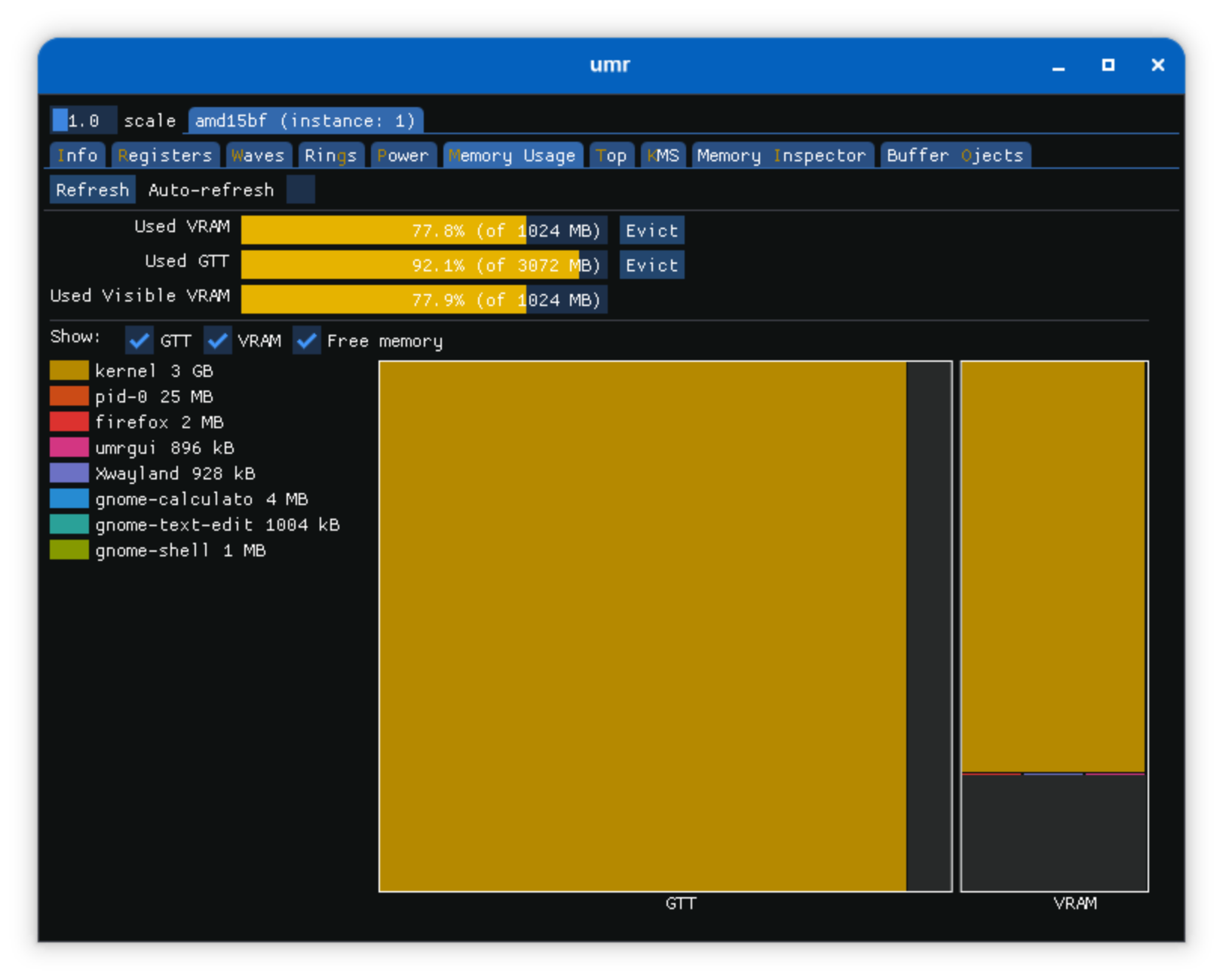
If you’re in a RAM-constrained situation and GTT seems to be an issue, you’ll probably just have to make your best guess and close whatever you hope makes the biggest change. It’s probably whatever has the most and/or largest windows open.
CONCERNS
My concern at this point is that, as far as I’ve found, there’s no real way to identify VRAM or GTT usage.
-
It’s not consistenly possible to identify RAM is allocated to the GTT, but the GTT isn’t using it.
I didn’t get into all the output of
freefrom each test, but the GTT increases are not completely reflected by increases in buff/cache.man freesays ‘cache’ includes slabs, but apparently that’s not always true.Maybe actually allocated is not needed, as long as we can see proper usage and assume memory pressure will free the rest.
-
I can’t see how much VRAM is used by any particular process, and top kind of lies by omission about RAM usage
Top can tell you firefox is using 900MiB of system ram, but it doesn’t tell you it’s also using 2000MiB+ of VRAM/GTT. You can see total VRAM & GTT, but you just have to guess as to what’s caused that, and in which proportions.
On an 8GiB system (with 7GiB usable), that’s the difference between Firefox using 12%, and it’s real 40% figure. That’s a significant difference.
And if I understand correctly, even a real GPU could still fall back to GTT and system ram, particularly if you have limited VRAM GPU. So this isn’t necessarily an iGPU issue, though it’s probably more relevant to those.
WORKAROUNDS
So now I started to look at limiting GTT allocation. According to dmesg, it could allocate up to 7GB of my RAM to the GTT, basically giving the GPU 50% of my 16GB!
amdgpu 0000:c3:00.0: amdgpu: amdgpu: 1024M of VRAM memory ready
amdgpu 0000:c3:00.0: amdgpu: amdgpu: 7306M of GTT memory ready.
Capping the total GTT memory limit.
GTT limits are set by the TTM module (don’t forget to rebuild initrd):
$ cat /etc/modprobe.d/ttm-gtt-limits.conf
#Uncomment desired GTT limit

#For 1GB:
#options ttm pages_limit=262144
#options ttm page_pool_size=262144

#For 2GB:
#options ttm pages_limit=524288
#options ttm page_pool_size=524288

#For 3GB:
#options ttm pages_limit=786432
#options ttm page_pool_size=786432
However, this made my system unusable. While the GTT was indeed capped, GNOME became unresponsive once firefox was running.
Disable hardware accelleration in Firefox.
There’s a user-facing setting for this (under Performance).
Unfortunately, Firefox is slooooow with this disabled. Scrolling is choppy, video seemed to play fine, but there was a delay while trying to interact with it (to pause, for example). Basically, I’m not using it like this.
So I’m back to where I was before, un-capped GTT and Firefox taking up all my ram (and lying about it).
FUTURE INVESTIGATION
-
Is there a way to see per-process VRAM usage? Can umr be fixed?
I can see totals, but I can’t see that xGB is related to vlc or yGB is firefox
-
I need a better way to manage “For Later” tabs.
This entire event wouldn’t have happened if I didn’t have 181 tabs.
Granted, they are mostly in collapsed groups (and therefore most should be unloaded especially after restart), but this firefox profile still caused the GTT to use >4.5GB almost immediately, even though 171 tabs were not focused (and thus not loaded).